
ALL OF OUR REGISTRATION IS DONE ON THE TEAMSNAP PLATFORM.
If you do not already have a Port Moody Soccer TeamSnap Registration account, you will need to create a username and password to create your account, then simply fill in the set-up and registration pages to complete your registration.
The information you enter into your account will be saved so that as you register for other programs or register other children in your family down the road you will not need to re-enter all information each time. Please ensure you keep your information up to date as this is our main resource should we need to contact you.
Step-by-step Guide
If you are looking to sign up for a youth sports program using TeamSnap ONE this guide will walk you through the entire registration process from start to finish.
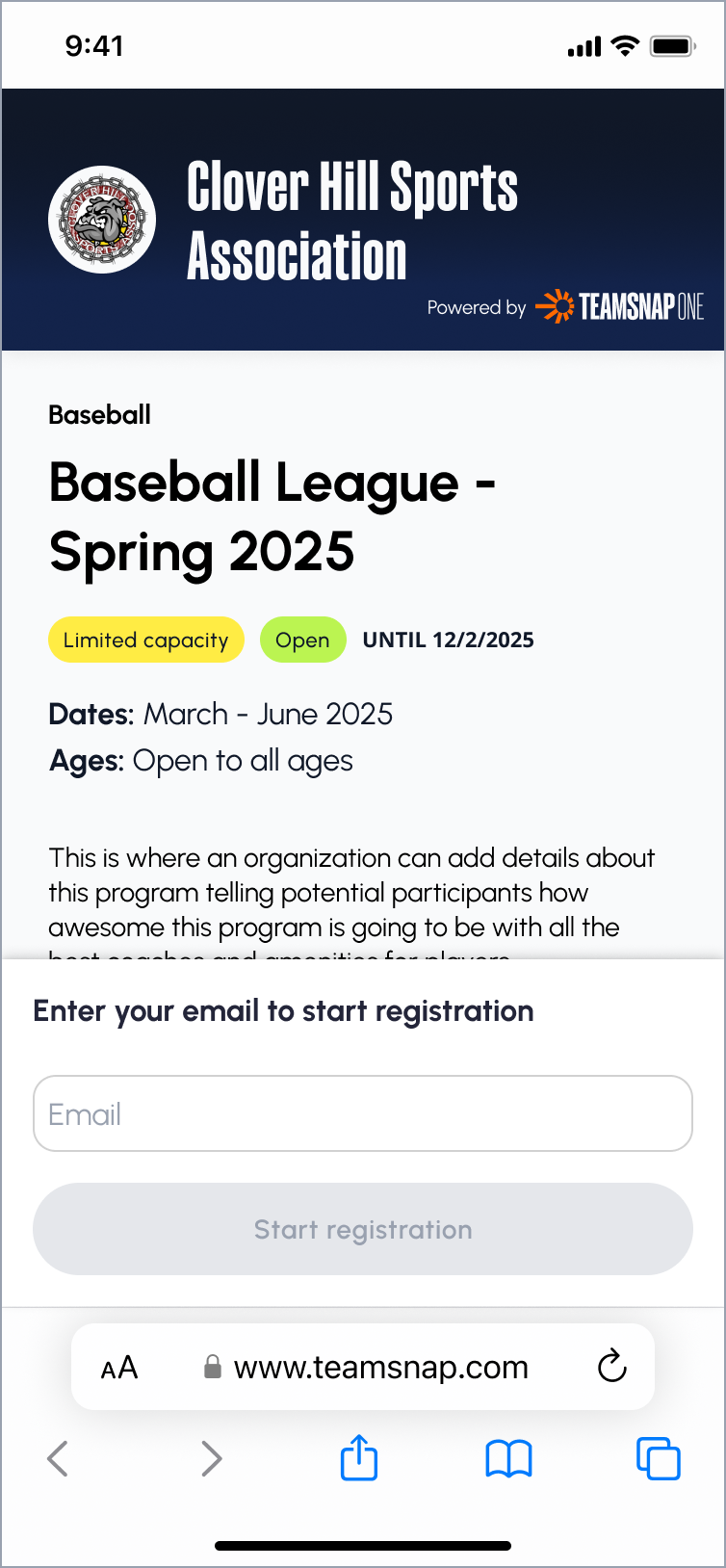
1. Begin Your Registration
To get started, you must first access the sports organization's registration form:
- You should have received or have access to a link to the registration form for the organization you intend to register with. This link is typically shared via email or found on the organization's public website or social media profiles.
- When you click the link to begin the registration process, you will be asked to either sign in if you are already a TeamSnap user, or to create your account if you are new to TeamSnap.
2. Select a Participant
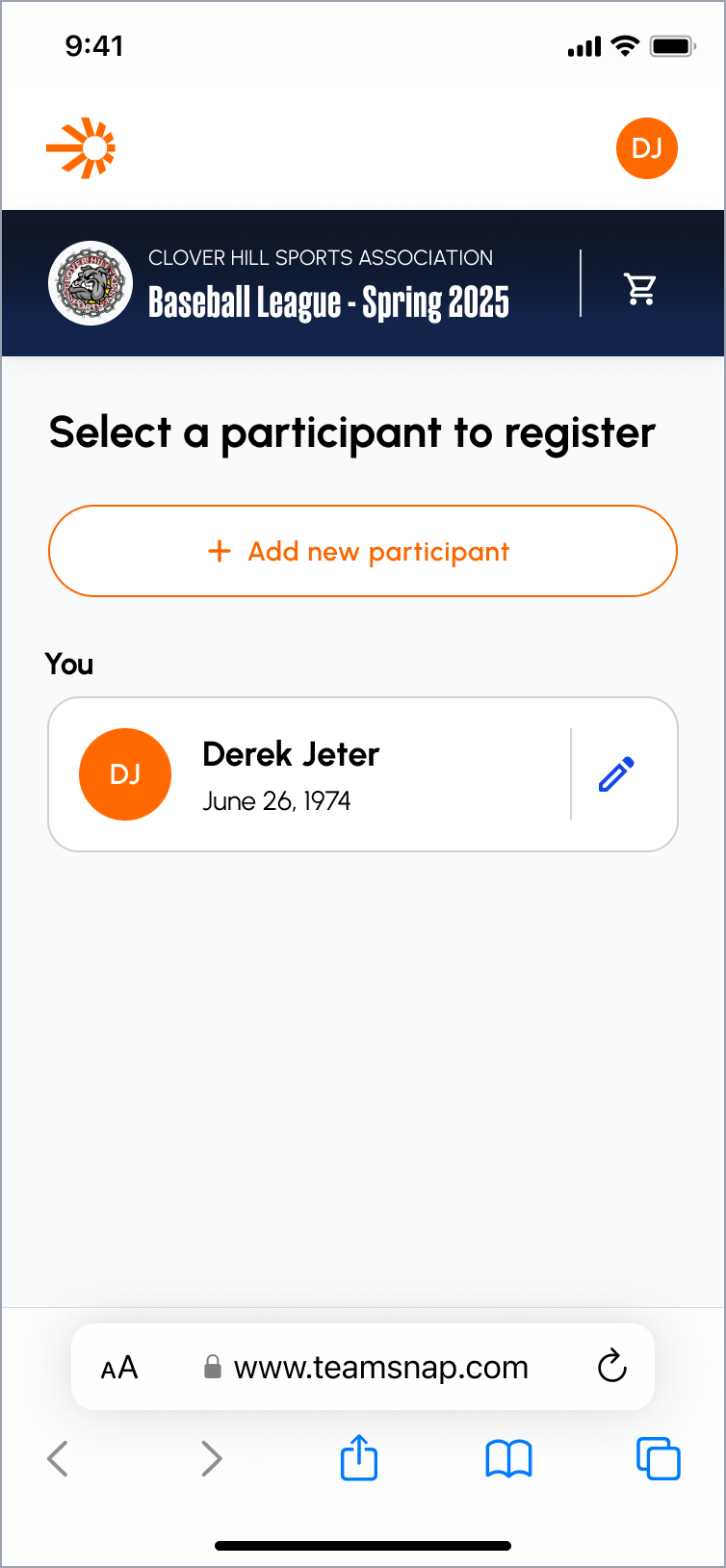
Once you are signed in, you must select the player who will be registered:
- Select an Existing Participant: You may choose a participant already associated with your account. The system will show which participants are eligible for the program, and which users are not (e.g., if a program is for 8-10 year-olds, a 15-year-old participant will be marked as ineligible).
- Add a New Participant: If the player is not in your account already, you can add them. You will be taken through a flow to enter the participant's information, including:
- First name
- Last name
- Gender
- Date of birth
3. National Governing Body Verification (Optional)
If the organization is affiliated with a national governing body (NGB) like Hockey Canada, USA Hockey, or USA Lacrosse, you may be asked to verify your player's data with the NGB to ensure compliance.
4. Choose a Registration Option
Next, you will be presented with the program options:
- Select a registration option: You will be asked to choose a registration option. Organizations typically offer several options based on age groups, gender groups, or price levels.
5. Additional Questions, Waivers and Add-ons (optional)
The following steps are optional and depend on the data required by the organization:
- Additional Questions: The organization may ask for contact details like your address, city, or other necessary information. You will also have the option to add another contact for your player, such as a spouse, caretaker, or family member.
- T-Shirt Size and Medical Info: You may be asked for player-specific details, such as t-shirt size, medical information, or other organizational requirements.
- Digital Agreements & Waivers: If your organization requires digital agreements or contracts, you will be asked to sign these waivers directly within the application flow.
- Add-Ons: You may see an optional step to purchase add-ons, such as insurance.
6. Waitlist
If the program has reached full capacity, you will be given the option to join the waitlist or remove your registration. If you join the waitlist, you will be notified if a spot opens up later.

7. Checkout and Confirmation
If the program is not at capacity, you will proceed to the checkout page:
- Registration Details: The checkout page displays the full details of your registration, including:
- The program(s) you signed up for.
- The participant(s) you signed up.
- The total price.
- Add More Registrations: You have the option to add another registration for the same participant, or to add a different player to another program within the same organization.
- Choose Payment: Select your desired payment method. Depending on the organization, available payment methods may differ. Also, if the organization offers payment plans, you will be able to select that option here.
- Confirm: Once payment is processed, you will see a confirmation screen and receive an email confirmation of your successful registration.
Division & Birth Year
As per BC Soccer regulations, our programs are organized by birth year. Spring and Summer 2025 & Fall/Winter 2025-2026 Season Age Groups:
| Birth Year | 2024 | 2023 | 2022 | 2021 | 2020 | 2019 | 2018 | 2017 | 2016 |
|---|---|---|---|---|---|---|---|---|---|
| Division | U2 | U3 | U4 | U5 | U6 | U7 | U8 | U9 | U10 |
| Birth Year | 2015 | 2014 | 2013 | 2012 | 2011 | 2010 | 2009 | 2008 | 2007 |
|---|---|---|---|---|---|---|---|---|---|
| Division | U11 | U12 | U13 | U14 | U15 | U16 | U17 | U18 | U19 |
Looking for a top-tier soccer club that can help you take your game to the next level?
Look no further than Port Moody Soccer Club! Our coaches have years of experience training players of all skill levels, and are passionate about helping each athlete unlock their true potential.
Learn MoreRegistration Dates
Registration opens at different times of the year for various programs offered through the Port Moody Soccer Club:
Registration will stay open past the deadline dates if there is space available on teams.
| Detail | |
|---|---|
| Youth Fall/Winter Season | Early bird until June 27. |
| Youth Spring Season | Opens mid/late January Deadline* to register is February 28 |
| Youth Spring Break Soccer Camps | Opens mid/late January |
| Youth Summer Camps | Opens in March |
| Evaluations | Opens mid/late January |
*To stay on track with league deadlines, order uniforms and gear, confirm coaches, and build team rosters on time, we need to set a registration deadline.
After the deadline:
- We review numbers by age and division to decide how many teams we can form.
- Registration stays open, but moves to a waitlist unless there's space on a team.
- If enough players join the waitlist and we can find a coach, we’ll try to create more teams.
Important
Just because you played with PMSC last season does not guarantee you a spot this season. Returning players do get priority — but only up to a certain date and only if there’s room in their age/division. After that, it’s first-come, first-served for everyone.
Registration Guidelines
All new players to PMSC must provide Proof of Birthdate to complete their registration. Please provide a copy of your child birth certificate during the registration process, or please email a copy (photo is fine) of a Birth Certificate, Passport, Citizenship Card or BC Services Card to registrar@portmoodysoccer.com or mail PMSC - PO Box #119 - 255 Newport Dr., Port Moody, BC, V3H 5H1.
Designated ‘development’ teams are for players who attended player evaluations and were selected to play for that team by the Club’s technical team. In the Fall/Winter season, players selected to play on a U8-U10 development, U11-U13 Div 1 or U14-U18 Metro team must register within 24 hours of being selected or that player’s spot will be forfeit and offered to another player. Development team registrations are not refundable. Players will need a special registration access code (received from your coach or coordinator) in order to register for a high-performance team.
Our online registration system accepts payment by Visa or MasterCard – this is preferred. If you chose to pay by cheque, payment must be received within five (5) days of registration. If you will be applying to KidSport, a copy of your application or KidSport confirmation is due to the Registrar within one (1) week of registration. Please email registrar@portmoodysoccer.com or mail PMSC - PO Box #119 - 255 Newport Dr., Port Moody, BC, V3H 5H1.
If registration in your division is full, do not despair! We work hard to form teams and as additional coaches are identified we may be able to open more spaces in a particular division. As spaces become available players will be taken from the waitlist on a first-come first-served bases. Our Coordinators also work with other neighbouring clubs to find teams for unplaced players.
Per BC Soccer regulations, all players must play in their respective age group and the registration system will automatically do this based on the players’ year of birth. Any exceptions must be approved by the Club’s Technical Team and manually changed in the registration system by the Registrar – these exceptions include:
- If there are insufficient players of the correct age group to complete a team. In this instance, younger players will have to play in an older age group, regardless of the number of players in each age group.
- If a player has been identified as being significantly advanced in skill and maturity such that playing in a higher age group is necessary to their player development.
- If a player has an identified physical or mental disability and is best placed in a different age group – this requires additional approval from the BC Soccer Association and medical support.
Need More Info?
Visit REGISTRATION FAQ page.